INSIDE THE INTELLIGENCE
Explore hardware. Build with Arduino.
From CPUs and cloud TPUs to Arduino boards, sensors and TinyML. Understand the components, follow a video tutorial and try a practical project.
Explore the components ↓Start with the workload. Choose software first, then check its supported processors, memory needs and acceleration options. A higher TOPS number alone is not a universal performance ranking.
Your Arduino starting path. Start with Arduino IDE 2, connect an UNO R4 WiFi, practise with a starter kit, then explore small on-device ML projects with the Nano 33 BLE Sense Rev2. Each card includes an official guide and a video learning link.
Selected videos are labelled with their topic or creator. Other links explicitly open a YouTube search. Check board revisions and current software instructions alongside any video.
Looking for specific chips and capacity? Explore AI Processors → for model specifications, manufacturer details and YouTube tutorials.
CPU
Category GENERAL COMPUTINGCentral Processing Unit
Runs the operating system, application logic, agent tools and data preparation. Useful for workloads with many different steps.
View hardware & setup details +
Runs the operating system, application logic, agent tools and data preparation. Useful for workloads with many different steps.
WHAT YOU CAN DORun a Python data-cleaning pipeline while an agent calls APIs.
Intel Technology · architecture explainer, not a comparison of every current processor.
Examples & components
Intel Core / Core Ultra; AMD Ryzen; Apple M-series CPU cores.
What to compare
Sustained performance, core count, cooling and software compatibility.
Getting started
- Read the official guide and check the prerequisites.
- Try the example task with a supported device or development environment.
- Check the result and note compatibility or resource limits.
GPU
Category PARALLEL COMPUTINGGraphics Processing Unit
Processes many operations in parallel. Used for graphics, gaming and supported AI training and inference workloads.
View hardware & setup details +
Processes many operations in parallel. Used for graphics, gaming and supported AI training and inference workloads.
WHAT YOU CAN DORun a compatible local language model or accelerate image generation.
Intel Technology · architecture explainer, not a comparison of every current processor.
Examples & components
NVIDIA GeForce RTX laptop GPUs; AMD Radeon; Apple integrated GPUs.
What to compare
GPU memory, supported AI framework, power limit and cooling. A laptop GPU can differ substantially from its desktop namesake.
Getting started
- Read the official guide and check the prerequisites.
- Try the example task with a supported device or development environment.
- Check the result and note compatibility or resource limits.
TPU
Category CLOUD AI ACCELERATORTensor Processing Unit
Google’s specialized accelerator for tensor operations in supported machine-learning workloads. Cloud TPUs are rented through Google Cloud.
View hardware & setup details +
Google’s specialized accelerator for tensor operations in supported machine-learning workloads. Cloud TPUs are rented through Google Cloud.
WHAT YOU CAN DOTrain or serve a compatible large model using cloud infrastructure.
Opens a topic search; individual videos have not been selected.
Examples & components
Google Cloud TPU infrastructure.
What to compare
Model and framework support, regional availability, memory and cloud cost. A Cloud TPU is not a normal laptop upgrade.
Getting started
- Read the official guide and check the prerequisites.
- Try the example task with a supported device or development environment.
- Check the result and note compatibility or resource limits.
NPU
Category ON-DEVICE AINeural Processing Unit
Accelerates supported AI tasks efficiently on the device. Benefits depend on the application and supported model.
View hardware & setup details +
Accelerates supported AI tasks efficiently on the device. Benefits depend on the application and supported model.
WHAT YOU CAN DOUse supported camera effects or other local AI features with lower power consumption.
Intel Technology · architecture explainer, not a comparison of every current processor.
Examples & components
Intel AI Boost in supported Core Ultra processors; AMD Ryzen AI; Apple Neural Engine.
What to compare
Application compatibility and supported model types. TOPS alone does not establish real application speed.
Getting started
- Read the official guide and check the prerequisites.
- Try the example task with a supported device or development environment.
- Check the result and note compatibility or resource limits.
RAM & VRAM
Category MODEL CAPACITYWorking memory and GPU memory
RAM holds active applications and data. VRAM holds data used by a discrete GPU. Some systems share a unified memory pool.
View hardware & setup details +
RAM holds active applications and data. VRAM holds data used by a discrete GPU. Some systems share a unified memory pool.
WHAT YOU CAN DOKeep a dataset in memory or load a local model without excessive swapping.
Opens a topic search; individual videos have not been selected.
Examples & components
System RAM, dedicated GPU VRAM and Apple unified memory.
What to compare
Check the exact model’s memory requirement, context length and quantization. Capacity can limit which models fit.
Getting started
- Read the official guide and check the prerequisites.
- Try the example task with a supported device or development environment.
- Check the result and note compatibility or resource limits.
SSD & cooling
Category THE REST OF THE SYSTEMStorage and sustained performance
Fast storage helps load datasets and models. Cooling and power delivery influence performance during long jobs.
View hardware & setup details +
Fast storage helps load datasets and models. Cooling and power delivery influence performance during long jobs.
WHAT YOU CAN DOWork with large datasets or run long processing jobs.
Opens a topic search; individual videos have not been selected.
Examples & components
NVMe SSDs; laptop cooling systems; mobile workstations.
What to compare
Usable SSD space, expansion options, sustained workload tests and serviceability.
Getting started
- Read the official guide and check the prerequisites.
- Try the example task with a supported device or development environment.
- Check the result and note compatibility or resource limits.
Arduino IDE
Category EMBEDDED DEVELOPMENTArduino IDE 2
Write, verify and upload sketches to compatible Arduino boards. The IDE is software; the connected microcontroller runs the uploaded program.
View hardware & setup details +
Write, verify and upload sketches to compatible Arduino boards. The IDE is software; the connected microcontroller runs the uploaded program.
WHAT YOU CAN DOConnect a board, upload the Blink example, then read sensor values using Serial Monitor.
Opens a topic search; individual videos have not been selected.
Examples & components
Arduino IDE 2, board packages, libraries and Serial Monitor.
What to compare
Install the board package and libraries for your exact board. Choose the right board and port before uploading.
Getting started
- Read the official guide and check the prerequisites.
- Try the example task with a supported device or development environment.
- Check the result and note compatibility or resource limits.
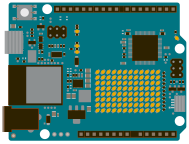 Arduino UNO R4 WiFi · official board illustration
Category MICROCONTROLLERS & IOTArduino UNO R4 WiFi
A development board combining an RA4M1 microcontroller with an ESP32-S3 connectivity module and a built-in LED matrix.
View hardware & setup details +
A development board combining an RA4M1 microcontroller with an ESP32-S3 connectivity module and a built-in LED matrix.
WHAT YOU CAN DORead a temperature sensor and display a status pattern on the LED matrix.
Paul McWhorter · introductory board lesson.
Examples & components
Sensor logging, connected displays, simple automation and Arduino Cloud projects.
What to compare
Check GPIO voltage, peripheral compatibility, power supply and available RAM before choosing a project.
Product image source ↗Getting started
- Read the official guide and check the prerequisites.
- Try the example task with a supported device or development environment.
- Check the result and note compatibility or resource limits.
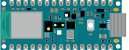 Arduino Nano 33 BLE Sense Rev2 · official board illustration
Category EDGE AI & TINYMLArduino Nano 33 BLE Sense Rev2
A compact sensor board for embedded machine-learning experiments and Bluetooth Low Energy projects. Tiny models can run on-device; it does not host a large language model.
View hardware & setup details +
A compact sensor board for embedded machine-learning experiments and Bluetooth Low Energy projects. Tiny models can run on-device; it does not host a large language model.
WHAT YOU CAN DOBuild a small motion classifier from sensor samples, then test it on the board.
Opens a topic search; individual videos have not been selected.
Examples & components
Motion, audio and environmental sensing with a compatible TinyML workflow.
What to compare
Use Rev2-compatible sensor libraries and check model memory requirements and the board’s 3.3 V logic.
Product image source ↗Getting started
- Read the official guide and check the prerequisites.
- Try the example task with a supported device or development environment.
- Check the result and note compatibility or resource limits.
Starter Kit R4
Category SENSORS & ELECTRONICSArduino Starter Kit R4
A hands-on entry point for learning circuits and programming with the UNO R4 WiFi and guided projects.
View hardware & setup details +
A hands-on entry point for learning circuits and programming with the UNO R4 WiFi and guided projects.
WHAT YOU CAN DOStart with a simple LED circuit, then add a sensor and program a response.
Opens a topic search; individual videos have not been selected.
Examples & components
Breadboard, components, sensors, switches and introductory projects.
What to compare
Check kit contents, documentation language and the voltage requirements of any extra modules.
Getting started
- Read the official guide and check the prerequisites.
- Try the example task with a supported device or development environment.
- Check the result and note compatibility or resource limits.
Find a laptop for your workload ↗